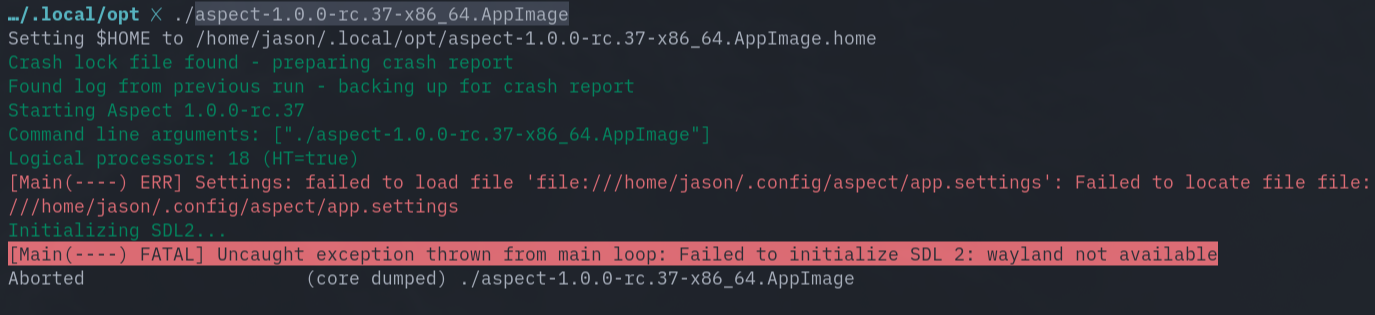
Linux (arch): Crashes when attempting to launch

Observed behavior

Expected behavior

The application to launch

Steps required to reproduce

  1. Downloaded AppImage: aspect-1.0.0-rc.37-x86_64.AppImage
  2. Made excutable: chmod +x aspect-1.0.0-rc.37-x86_64.AppImage
  3. Attempting to launch from the terminal: ./aspect-1.0.0-rc.37-x86_64.AppImage

Operating system/Hardware used

Based on Arch Linux.

PC: Laptop 13 (Intel Core Ultra Series 1) (A2)
 │ ├ Intel(R) Core™ Ultra 5 125H (8+10) @ 4.50 GHz
 │ ├ Intel Arc Graphics @ 2.20 GHz [Integrated]
 │ ├ 2880x1920 @ 1.5x in 14", 120 Hz [Built-in]
 │ ├ 147.96 GiB / 929.50 GiB (16%) - btrfs
 │ ├ 3.20 GiB / 30.81 GiB (10%)
 └ └ 0 B / 4.00 GiB (0%)

OS: Omarchy v3.0.2
 │ ├ master
 │ ├ Linux 6.17.2-arch1-1
 │ ├ Hyprland 0.51.1 (Wayland)
 │ ├ alacritty 0.15.1
 │ ├ 1265 (pacman)
 │ ├ One Dark Pro
 └ └ alacritty (9pt)

aspect-log-crash-20251019T172837.sdl (4.5 KB)

Looks like libsdl2 failed to detect X11 support. I’ll get an Omarchy ISO and look into whether Hyprland/Wayland can be made to work.

We don’t have native Wayland support, yet, so this can generally be problematic. On Cinnamon/Wayland, the application seems to work fine, although I’m getting LLVMpipe based software rendering (which is surprisingly fast, though).

Okay, setting SDL_VIDEODRIVER to x11 when running the application makes it work:

SDL_VIDEODRIVER=x11 ./aspect-1.0.0-rc.37-x86_64.AppImage

I’ll set a hint to force X11 programmatically for the next release.

Confirmed that works. I had installed xorg-xwayland previously, I assume that’s required?

When I tried, it worked with a fresh install without any additional packages, so I’d say it isn’t required. But I really have no idea which X server for Wayland is the best or which one is pre-installed, so it could still make a difference.

I confirmed that you do not have to install xorg-xwayland to get this to work. Thank you! For future reference, and until you get the AppImage updated, here’s an example desktop file that folks can use:

[Desktop Entry]
Name=Aspect
StartupNotify=true
Type=Application
Exec=env SDL_VIDEODRIVER=x11 /<path to AppImage>/aspect-1.0.0-rc.37-x86_64.AppImage

After testing again on Omarchy, it turns out that the issue is one step deeper there - there is a pre-defined environment variable SDL_VIDEODRIVER=wayland there in an apparent attempt to force applications to use the Wayland interface. A better approach for that would be to set SDL_VIDEODRIVER=wayland,x11 in order to let SDL applications prefer Wayland, but still allow them to fall back to X11.

I’ll include a further workaround for the next release that also overrides that explicit environment variable.

Soenke, thank you for the continued support on this issue. Anything I can do to assist?

And I wonder if this is something I can bring up with the Omarchy team.

It seems to work now by manually overriding the environment variable within the application (starting with the upcoming 1.0.0-rc.39).

I did a quick search now and someone has already reported the same issue affecting Windows/Proton games to the Omarchy project: Setting `SDL_VIDEODRIVER=wayland` as a default causes compatibility issues with Proton games · Issue #2564 · basecamp/omarchy · GitHub

Thanks again @Soenke , Can confirm that I no longer have to manually override the env variable for Aspect to work with the latest version of Aspect 1.0.0-rc.38.