Hello,
I’m using the DAM Daminion (Windows version v7.0.0). I’d like to migrate to Aspect keeping the tags.
Does Aspect offert this option ?
I imported some photos but XMP data are not read by Aspect.
Thanks,
Hello,
I’m using the DAM Daminion (Windows version v7.0.0). I’d like to migrate to Aspect keeping the tags.
Does Aspect offert this option ?
I imported some photos but XMP data are not read by Aspect.
Thanks,
Do you know or possibly have a concrete example of how Daminion stores its tags? If they are stored as standard XMP, they should be imported and displayed in Aspect fine. If it instead just stores them in some kind of proprietary catalog, this would require a custom importer, similar to the Aperture importer extension. I could have a look at this if you can provide a small example library where you have one or two smallish images with some tags assigned.
Thanks for answering so quickly ! Here, you are a link with a few images.
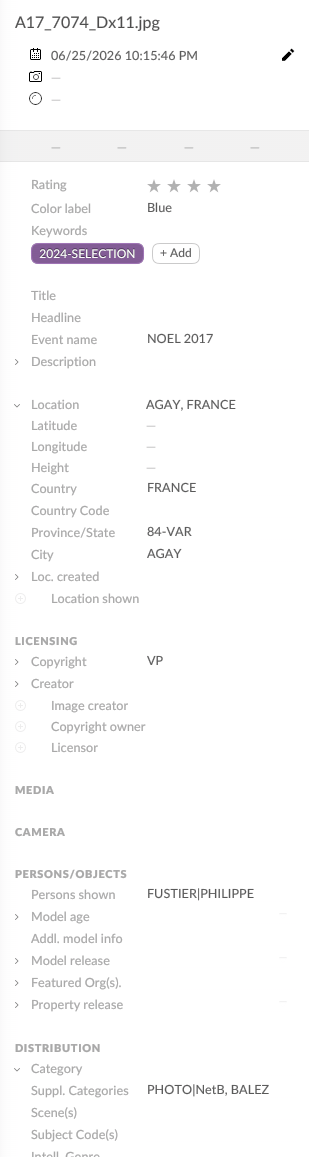
On the “A17_7074_Dx11.jpg” , I wrote a lot of tags.
(link removed)
I’ve looked through the images (manually, as well as using different metadata tools) and I’ve just found a single keyword/tag in three of the files (2024-SELECTION), as well some “supplemental categories” in five of the images (e.g. PHOTO|PANORAMA, ANDALOUSIE|RUE). Considering the “A17…” image is supposed to contain quite a few tags, I would assume that those are only stored within Daminion’s central catalog.
Is there maybe a menu entry or setting in Daminion to force writing all metadata to the file?
One other thing that stood out was an apparently invalid offset for EXIF data in the file. Are the files supposed to contain EXIF data, or has that been stripped deliberately?
Hi !
Okay, I now see how Daminion is using the term “tag” (they use it as a synonym for “metadata field” ) - I think apart from the “location” field everything is displayed in Aspect, too, then:
We are currently displaying the city/country as the “location”, but it probably makes more sense to have the “Iptc4xmpCore:Location” value there (“Eglise” in this case).
So, could you tell me what are the possibilities ? Is the file daminion-tag-avion.txt the Daminion’s central catalog ? Is it usable ? And at the end, is Aspect able to build its own catalog with this file and the XMP data of each photo (as you made the assumption in your first message) ? May be the pro version has this capacity ? Thanks !
daminion-tag-avion.txt appears to contain the list of all keywords that are available to choose from when tagging images. However, there is no connection to the individual photos there, so it is not the catalog file itself.
The main question now is whether the metadata that is contained in the images themselves is all there is, or if Daminion shows additional fields or more than the single “2024-SELECTION” keyword.
If the metadata in the files is indeed complete, then Aspect should pick them up and have them available for searching etc. If they are not complete, we’d have to dig a bit deeper into how Daminion stores its catalog in order to determine how easy it would be to import the additional metadata.
Hi, I found an other file (2017etsuivantes.dmc) in which there are the information about all the pictures in addition to the jpeg’s IPTC. The connection to the individual photo is probably here. Does it help for the analysis ?
I’ve looked at the .dmc file and it does indeed apparently contain data associated with all files in the catalog. From what I could see, there is really only one piece of information that is not already stored in the file itself – the time when each image was added to the catalog. Everything else appears to be present in the XMP metadata of the JPEG file.
Based on this I would say that it should be enough to just point Aspect to the folder that contains the images and it should pick up all metadata.