a new version of Aspect has been released: 1.0.0-rc.48 (view blog post). You’ll find the download links in the next section of this post. Simply install over the existing installation to upgrade.
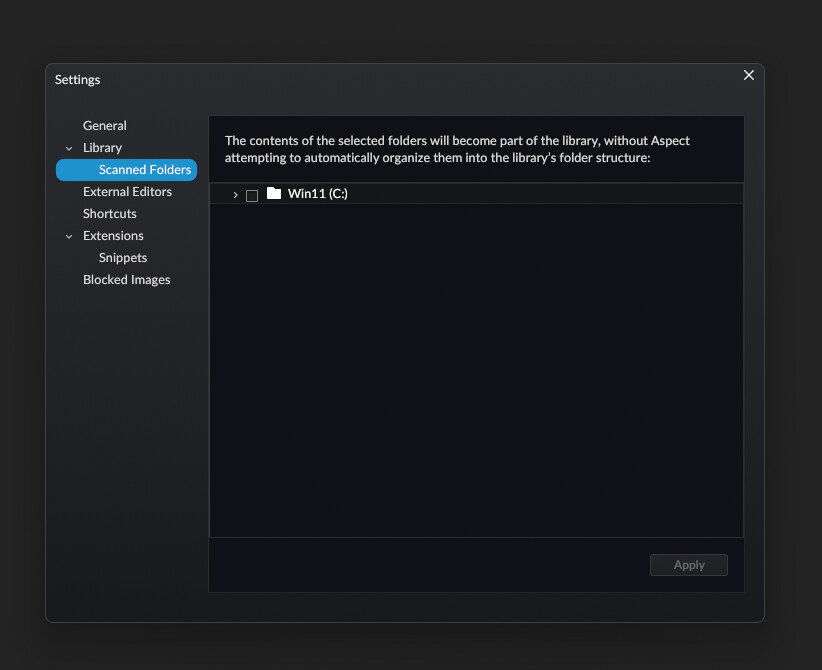
How is this a release candidate when I still can’t add my library to the app? The app can’t add any library that is on a secondary hard drive. It only shows the internal C: drive as an available source. I have 6 different disks on my system.
This is by design. The idea is to have every disk be autonomous, which increases robustness and is particularly useful for external disks, as that allows them to be used for managing the library away from the main computer.
Setting this up is currently a manual process – see “Splitting a library over multiple hard disks”. We do plan to include a UI for managing multiple disks in a vastly simplified way, but this is something that had to be postponed for after the 1.0.0 release.
Using existing files from other software stored on an external/secondary drive (as is the standard for photography workflows) currently feels like seeing a boarded up front door, and having signs point to go to the back of the hotel, walk in through the kitchen, and find the service elevator, with waiters and chefs getting in the way.
I wouldn’t necessarily word it that way, but I definitely agree that it’s currently not really clear how that is supposed to work. I’ve added a note with a link to the documentation page to the “Scanned Folders” settings page for now to somewhat mitigate that.
Ultimately the idea is to make this process mostly transparent by allowing to select any number of directories, both in the settings dialog and in the library creation dialog. The application would then automatically prompt for a new library folder if no library instance exists yet on that drive (as well as handling ambiguous cases, for example when there are multiple library instances on a single drive).
 Windows installer (x86_64)
 Getting started with the server version